Изменения документа PRISIJUNGIMAS PRIE StockM
на 2022/10/27 12:04
на 2019/12/17 15:30
Комментарий
-
Свойства страницы (2 изменено, 0 добавлено, 0 удалено)
Подробности
- Свойства страницы
-
- Название
-
... ... @@ -1,1 +1,1 @@ 1 -ВХОД В СИСТЕМУ S tockM1 +ВХОД В СИСТЕМУ STOCK-M - Содержимое
-
... ... @@ -1,8 +1,9 @@ 1 + 1 1 == **Вход в систему** == 2 2 3 -**Вход в систему управления запасами StockM** 4 +**Вход в систему управления запасами Stock-M** 4 4 5 -~1. Вход в систему управления запасами StockM осуществляется по выделенному Web-адресу [[http:~~/~~/название_компании.stockm.net>>url:http://xn--mons_pavadinimas-pdc24b.stockm.net/]]6 +~1. Вход в систему управления запасами Stock-M осуществляется по выделенному Web-адресу http:~/~/xxx.stockm.info 6 6 7 7 2. Пользователи, имеющие право входа в систему, вводят Логин и Пароль. 8 8
Вход в систему
Вход в систему управления запасами StockM
Вход в систему управления запасами Stock-M
1. Вход в систему управления запасами StockM осуществляется по выделенному Web-адресу http://название_компании.stockm.net
1. Вход в систему управления запасами Stock-M осуществляется по выделенному Web-адресу http://xxx.stockm.info
2. Пользователи, имеющие право входа в систему, вводят Логин и Пароль.
3. Если пользователь забыл пароль, он может отправить себе ссылку на восстановление пароля, нажав на "Я забыл свой пароль". При этом имя пользователя должно совпадать с адресом электронной почты, на который система отправит ссылку.
4. При выборе флажка "Оставаться в системе" у Вас не будет необходимости входить в систему каждый раз. Система запомнит Вас до момента выключения оборудования(но не более, чем на 24 часа).

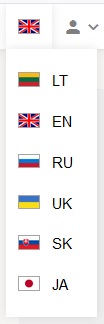
Выбор языка
После входа в систему Вы можете выбрать один из предложенных языков.
После смены языка открытые окна не закрываются, а только перегружаются.
Изменение пароля
После входа в систему в меню "ПРОФИЛЬ" Вы можете изменить пароль на вход в систему.
