Changes for page NAUJIENOS
Summary
-
Page properties (1 modified, 0 added, 0 removed)
Details
- Page properties
-
- Content
-
... ... @@ -1,5 +1,18 @@ 1 -= StockM update 2020.01. 09.=1 += StockM update 2020.01.16 = 2 2 3 +**Taking into account free balance (quantity in stock) when forming a spec. order (PTO).** 4 + 5 +Some companies form spec orders (if such exists) using reservation which is transferred to StockM with the help of the PTO. csv file. 6 + 7 +Since this update, new setting up in SM Admine is created by which you can choose whether to take into account the free warehouse balance, or to ignore it, when forming spec. order to the supplier. 8 + 9 +If it is set that free warehouse balance does not have to be evaluated, the spec. order (PTO) will be sent to the supplier regardless of the current free balance in the warehouse. In other words, even the balance in stock is enough, spec. order will be sent to the supplier from the PTO file (the quantity is rounded up to the full packing). 10 + 11 +The setup works at company level — for all items in all warehouses. 12 + 13 + 14 += StockM update 2020.01.09 = 15 + 3 3 **Weight and volume amounts in Inventory window.** 4 4 5 5 At the bottom of Inventory window, close to the balance and amount to be ordered, amount of weight and volume can be seen (according to the list of products filtered as seen in the window). ... ... @@ -8,7 +8,6 @@ 8 8 9 9 [[image:atnaujinimas20200108.png]] 10 10 11 - 12 12 = StockM update 2019.12.12. = 13 13 14 14 **~ Maximum number of transports in optimization.** ... ... @@ -20,44 +20,3 @@ 20 20 The system will choose one kind of transport, while optimizing an order, and will fill in only that kind of transport till the specified maximum number. 21 21 22 22 [[image:picture_.png]] 23 - 24 - 25 - 26 -= StockM update 2019.08.01. = 27 - 28 - 29 -**~1. Removing supplier activity**. 30 - 31 -Until now, it was not allowed to remove supplier activity if the supplier had active delivery schedules. 32 - 33 -After update, when supplier activity is removed, all activities are automatically removed from supplier schedules as well. Supply schedules are not even visible. 34 - 35 -If you will set activity on for the supplier, the shedules will be visible but not active - you will need to check and confirm it. 36 - 37 -**2. New critical notification: „Active items don‘t have active supplier“**. 38 - 39 -There is created warning of critical error: “Active items don’t have active supplier”. All active items will get into this list (not NA state and not NM state), for which inactive supplier is assigned. Items, which have OUT mover feature, will not be involved into the list. 40 - 41 -For such items you will have to assign an active supplier. 42 - 43 -[[image:Activeproducts.png]] 44 - 45 - 46 -**3. The reason for changing the buffer, when the user disagrees with the system's suggested buffer**. 47 - 48 -Earlier, when the user disagreed with the system's suggested buffer, he left the former buffer - the system asked to specify the reason. 49 - 50 -After update, the reason will be assigned automatically, when the user will disagree with the system's offer to change the buffer and will leave former buffer. 51 - 52 -If another buffer will be specified (not that one, which was recommended by system), you will have to specify the reason. 53 - 54 -**~ ** 55 - 56 -**4. New column in the new orders window: “Notes in new order window”**. 57 - 58 -In the window “New orders” you can see new column “Notes in new order window”, where you can see information from the field “Notes in new order window” in the supplier card. 59 - 60 -[[image:NotesNewOrderWindow.png]] 61 - 62 - 63 -[[image:Orderdata.png]]
StockM update 2020.01.09.
StockM update 2020.01.16
Taking into account free balance (quantity in stock) when forming a spec. order (PTO).
Some companies form spec orders (if such exists) using reservation which is transferred to StockM with the help of the PTO. csv file.
Since this update, new setting up in SM Admine is created by which you can choose whether to take into account the free warehouse balance, or to ignore it, when forming spec. order to the supplier.
If it is set that free warehouse balance does not have to be evaluated, the spec. order (PTO) will be sent to the supplier regardless of the current free balance in the warehouse. In other words, even the balance in stock is enough, spec. order will be sent to the supplier from the PTO file (the quantity is rounded up to the full packing).
The setup works at company level — for all items in all warehouses.
StockM update 2020.01.09
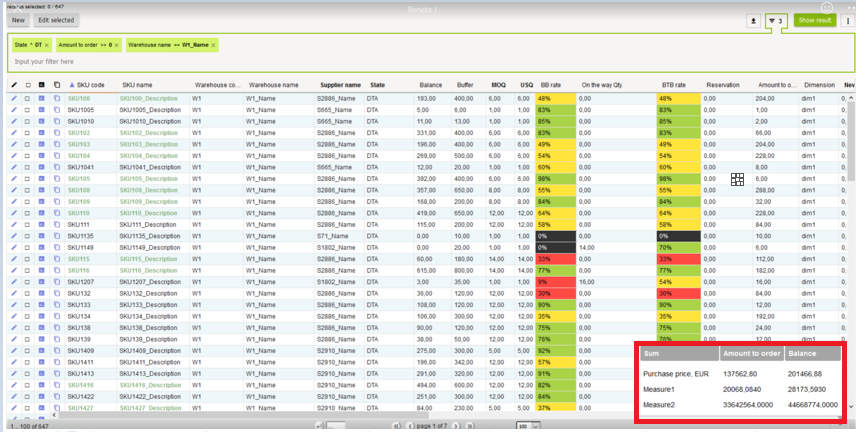
Weight and volume amounts in Inventory window.
At the bottom of Inventory window, close to the balance and amount to be ordered, amount of weight and volume can be seen (according to the list of products filtered as seen in the window).
Since this update, by clicking on the icon on the right bottom corner the table will occur which shows complete information.
StockM update 2019.12.12.
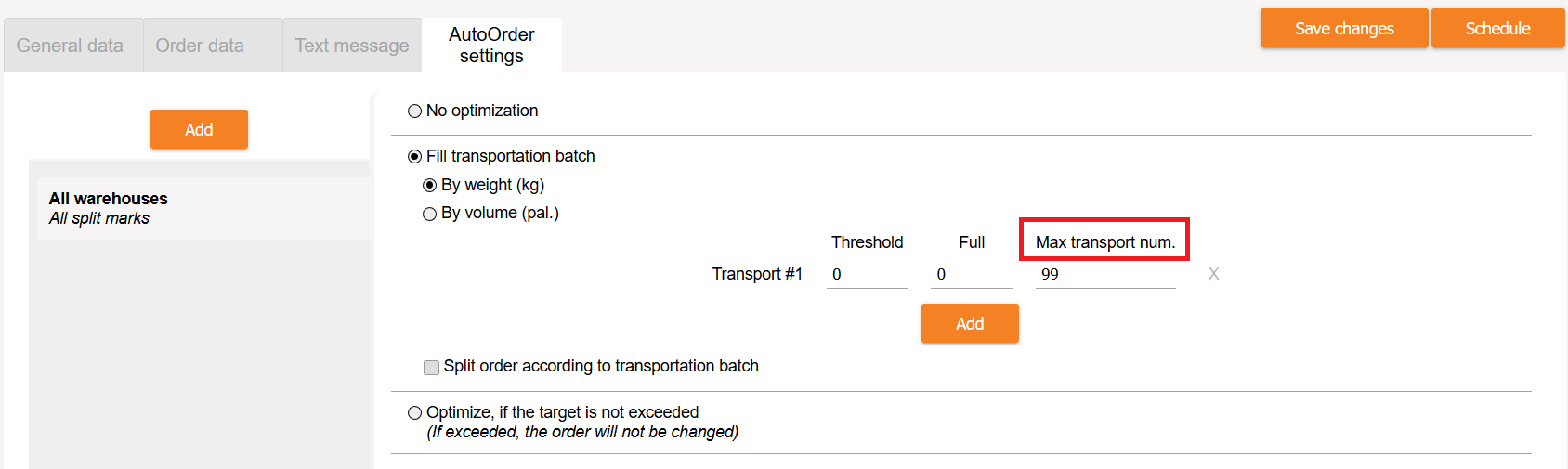
Maximum number of transports in optimization.
In the supplier‘s card near AutoOrder settings by describing transport (AutoOrder settings -> Fill transportation batch) you can show how many transports can be (the maximum number of transports).
The system will choose one kind of transport, while optimizing an order, and will fill in only that kind of transport till the specified maximum number.
StockM update 2019.08.01.
1. Removing supplier activity.
Until now, it was not allowed to remove supplier activity if the supplier had active delivery schedules.
After update, when supplier activity is removed, all activities are automatically removed from supplier schedules as well. Supply schedules are not even visible.
If you will set activity on for the supplier, the shedules will be visible but not active - you will need to check and confirm it.
2. New critical notification: „Active items don‘t have active supplier“.
There is created warning of critical error: “Active items don’t have active supplier”. All active items will get into this list (not NA state and not NM state), for which inactive supplier is assigned. Items, which have OUT mover feature, will not be involved into the list.
For such items you will have to assign an active supplier.

3. The reason for changing the buffer, when the user disagrees with the system's suggested buffer.
Earlier, when the user disagreed with the system's suggested buffer, he left the former buffer - the system asked to specify the reason.
After update, the reason will be assigned automatically, when the user will disagree with the system's offer to change the buffer and will leave former buffer.
If another buffer will be specified (not that one, which was recommended by system), you will have to specify the reason.
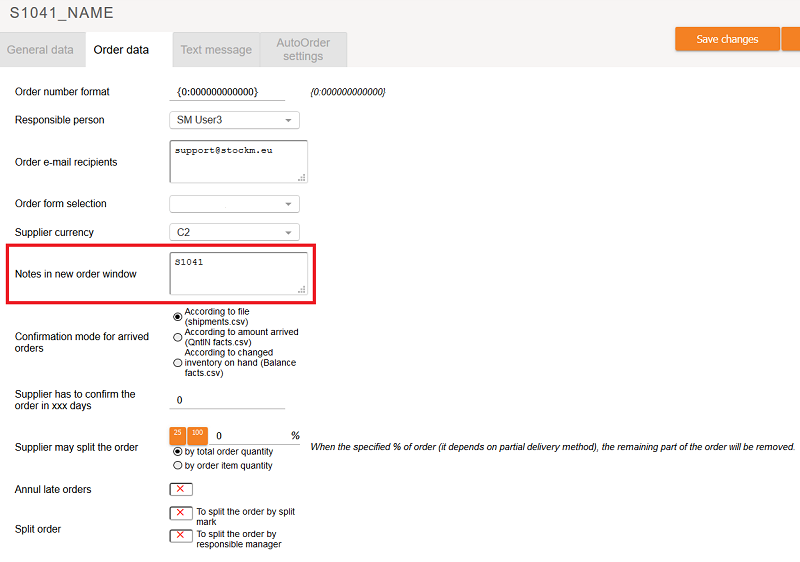
4. New column in the new orders window: “Notes in new order window”.
In the window “New orders” you can see new column “Notes in new order window”, where you can see information from the field “Notes in new order window” in the supplier card.