Changes for page DUK
Summary
-
Page properties (1 modified, 0 added, 0 removed)
Details
- Page properties
-
- Content
-
... ... @@ -99,10 +99,8 @@ 99 99 100 100 **It is necessary to determine the minimum buffer and the system will not allow the buffer to decrease below the specified limit. Minimum buffer is the value at which the buffer can be reduced (buffer cannot be less than MinBuf or MOQ). The minimum buffer is changed on the item card. The minimum buffer is used when sales may be smaller, but it is necessary to keep in store more. For example, tyres, they can be sold as 1 pc, but most often the customer buys the whole set, i.e. 4 pcs. In this case, after setting the minimum buffer of 4, whatever the sales are, the system will not allow the buffer below 4.** 101 101 102 -== == 103 103 104 104 105 - 106 106 ---- 107 107 108 108 (% class="wikigeneratedid" id="HArreikiakeistibufer12F2Ckaiilginamastiekimolaikas3F" %) ... ... @@ -142,10 +142,11 @@ 142 142 143 143 ---- 144 144 145 -== ** Ar galimapadarytDTOprekėmsišstatymą,kad nerodytų pertekliaus?143 +== **Can DTO items be showed not as a surplus if they are used in exposition?** == 146 146 147 -N e,nes DTOprekėyrata,kuriužsakomatikpagalspec.užsakymą.Jei prekęatsivežė,parduosir daugiauneužsakys, tuometjąirreikiapaliktiDTO–tiesiogtokiarealybė.Jei prekęatsivežė,parduosir vėl atsiveš–prekėDTA,jeinenorime,kadjaikeistųsibuferis– buferįreikiafiksuoti**Min.buf=BUF=Max.buf**.145 +No, because the DTO item is the one that is ordered only on a special order. If the product has been brought, sold and will not be ordered again, then it should be left as DTO. If the product has been brought, sold and will be ordered again – the item is DTA. If you do not want the buffer to change – the buffer must be fixed in Min. buf = BUF = Max. buf. 148 148 147 + 149 149 ---- 150 150 151 151 == **Kaip skaičiuojami "ROI" ir "apyvartumas"?** == ... ... @@ -157,10 +157,15 @@ 157 157 158 158 ---- 159 159 160 -== ** Kokiomiskainomisskaičiuojamipardavimai?** ==159 +== **How "ROI" and "turnover rate" are calculated ?** == 161 161 162 - ViskasSTOCK-M‘e,išskyrus maržą, skaičiuojama pirkimo kainomis.161 +== == 163 163 163 +Turnover is the ratio of sales and inventory (at purchase prices). Red line in Inventory Dynamics reports window shows turnover rate as times per year (the higher figure, the better result), i.e. how many times per year the inventory of the company "turns over" . Turnover you can find in Dashboard (window Today/ Home) is calculated in days (the lower figure, the better), i.e. for how many days you will have inventory on stock. 164 + 165 +ROI is the ratio of margin and average inventory, inventory is calculated at purchase prices. The discounts are not known, therefore, the figure is just indicative to track trend. ROI is showed as a blue line in the Inventory Dynamics reports window. 166 + 167 + 164 164 ---- 165 165 166 166 == **Kaip STOCK-M’e priskirti alternatyvius tiekėjus?** ==
- HOW...?
- What settings should be made in STOCK-M if several managers work with the same supplier?
- What should I do if order is not formed?
- What's the difference between regular and special order ?
- Is it necessary to "remove" the activity of the supplier with whom we do not work anymore?
- How to proceed when the supplier's goods are sold out or the supplier is refused?
- How is the supplier's reliability calculated when the supplier delivers items more than it was ordered ?
- What parameters are assessed to calculate reliability of supplier?
- How to set up warehouse information on the order form?
- What should be done to prevent the buffer from the too big decrease?
- DUK
- Kaip pakeisti buferį keičiantis užsakymų dažnumui?
- Ar galima padaryt DTO prekėms išstatymą, kad nerodytų pertekliaus?
- Can DTO items be showed not as a surplus if they are used in exposition?
- Kaip skaičiuojami "ROI" ir "apyvartumas"?
- Kokiomis kainomis skaičiuojami pardavimai?
- How "ROI" and "turnover rate" are calculated ?
- DUK
- Kaip STOCK-M’e priskirti alternatyvius tiekėjus?
- Kur galima pamatyti visų sistemoje esančių prekių sąrašus?
- Kada naudojamas PTO?
- Kaip priskiriami prioritetai PTO rezervacijai?
- Kaip formuojamas užsakymas, kai PTO rezervacijos prekė DTA?
- Kaip formuojamas užsakymas, kai PTO rezervacijos prekė DTO?
- Kaip veikia PTO prioritetai?
- KODĖL...?
- Kodėl šiandien prekė nepateko į reguliarų užsakymą?
- Kodėl sistema siūlo užsakyti būtent tiek?
- Kodėl buferis keičiamas mažiau nei per zoną?
- Kokie nustatymai turi būti, kad perskaičiuojant buferį, būtų vertinamas skaičius po kablelio?
- Kodėl pasikeitė buferis?
- Kada prekei priskiriamas NA būvis?
- Kada prekei priskiriamas požymis NEW?
- Kada prekei priskiriamas požymis OUT?
- Kada prekei priskiriamas požymis TOP?
- Kada prekei priskiriamas požymis NON?
- Kada prekei gali būti priskirta žymė TOP+NON?
HOW...?
What settings should be made in STOCK-M if several managers work with the same supplier?
A check mark in the "Supplier Edit" window must be placed on both tags for splitting orders.
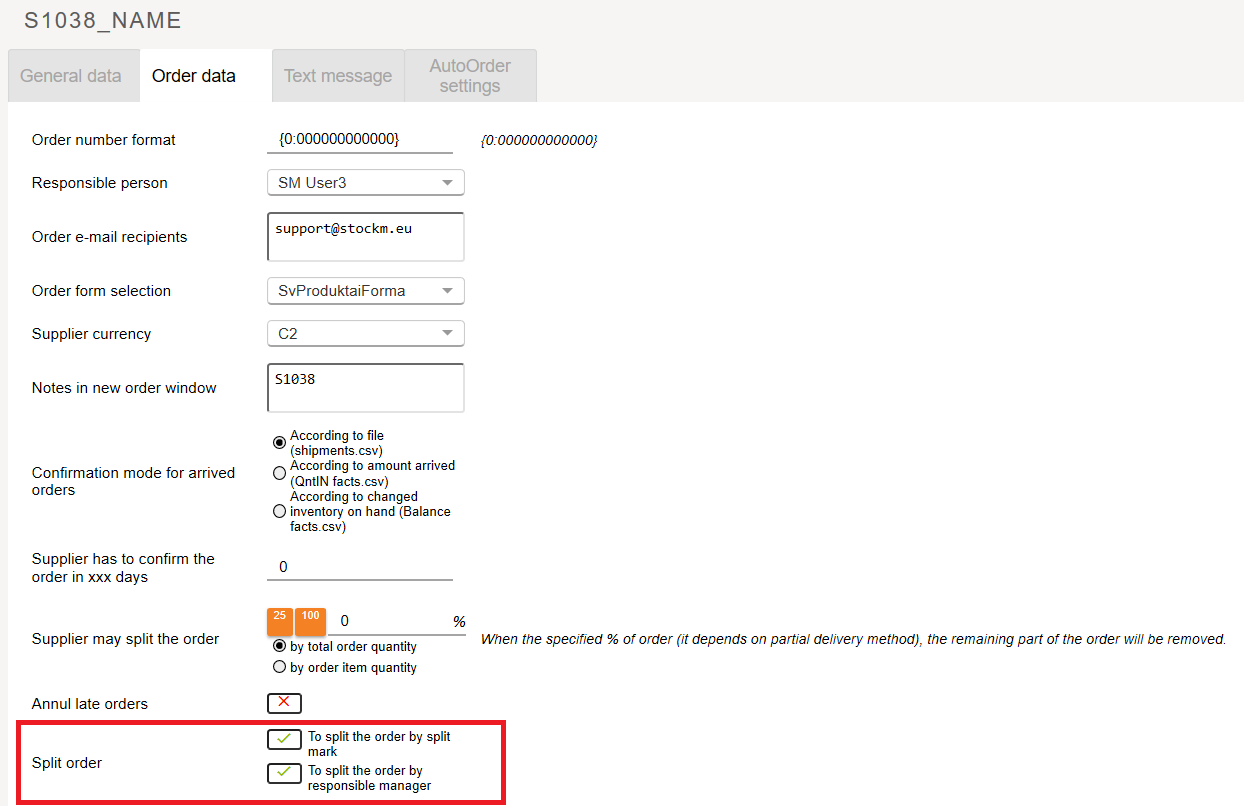
The system will first create orders based on the responsible manager for the products as well as will split the orders according to the splitting tag that is assigned to the items.

For more information about order separations, see the ORDER SPLIT MARK MANAGEMENT RULES
What should I do if order is not formed?
1. Verify that the data exchange has been successfully completed.
2. Check the supply schedule.
3. In the Inventory window, filter out the supplier's items with the value "Order" > 0.
4. If the data exchange has completed successfully, the order had to be formed according to the supply schedule. Therefore, in the window of Inventory, you see that there are items to be ordered – form a new order manually. Orders → Create order.
What's the difference between regular and special order ?
A regular order is formed according to the STOCK-M calculated demand, the quantities that the system will add into the order can be seen in the Inventory window. Ordered quantities will be seen as "On the way" after sending a regular order. Regular orders can be of two types:
-a regular order formed by the system according to the supplier's schedule.
-a regular order is formed manually. If an order is not created, even though it had to be created or the order has to be sent at other time than indicated in the schedule.
Special Orders – are formed manually only, such orders are used to order quantities not under the system, for example, for the first (primary) distribution of the item, for a one-time promotion campaign agreed with the supplier, and so on. They can also be of two types:
-a special order with a quantity on the way. Used when we want the ordered quantity to be visible and the system to assess it by forming regular orders. Ordered quantities will be seen "On the way".
-a special order without quantity on the way. Used when the ordered quantity does not have to effect on quantities of regular orders. Ordered quantities will not be seen as On the way".
For more information about orders, see ORDERS MANAGEMENT
Is it necessary to "remove" the activity of the supplier with whom we do not work anymore?
If supplier is changed, it is necessary to "remove" activity for the old supplier of the item. If the activity is not "removed" and the goods are assigned to another supplier, orders will be formed for the new assigned supplier. Even the remaining activity of the old supplier will not effect on any process, the old supplier will be visible in the windows of active suppliers and supply schedules, thus, will distort the real situation.
How to proceed when the supplier's goods are sold out or the supplier is refused?
There are two options:
- all the items from that supplier are derived from the assortment and no items on the same codes will not be purchased from other suppliers. In this case, you must delete the schedule and remove activity tag from that supplier. The system will ask if all the items of that supplier need OUT mover tag to be put on? Select YES.
Read more about items Items (SKU) marks TOP, NON, OUT, NEW
- you will not work with that supplier, but items on the same codes will be purchased from other suppliers. Delete the schedule and remove activity for the old supplier, but when system will ask if all the items of that supplier need OUT mover tag to be put on – Select "NO".
Read more about Change of supplier's order formation or change of the item supplier
How is the supplier's reliability calculated when the supplier delivers items more than it was ordered ?
Any deviation (too small or too large quantity delivered) from the sent order reduces the supplier's reliability. For example, if you ordered 100 lines and the supplier delivered 120 lines – supplier's reliability is 100/120 i.e. 83%
What parameters are assessed to calculate reliability of supplier?
The exact and time-delivered order, i.e. the delivered order lines and the actual delivery time are assessed.
How to set up warehouse information on the order form?
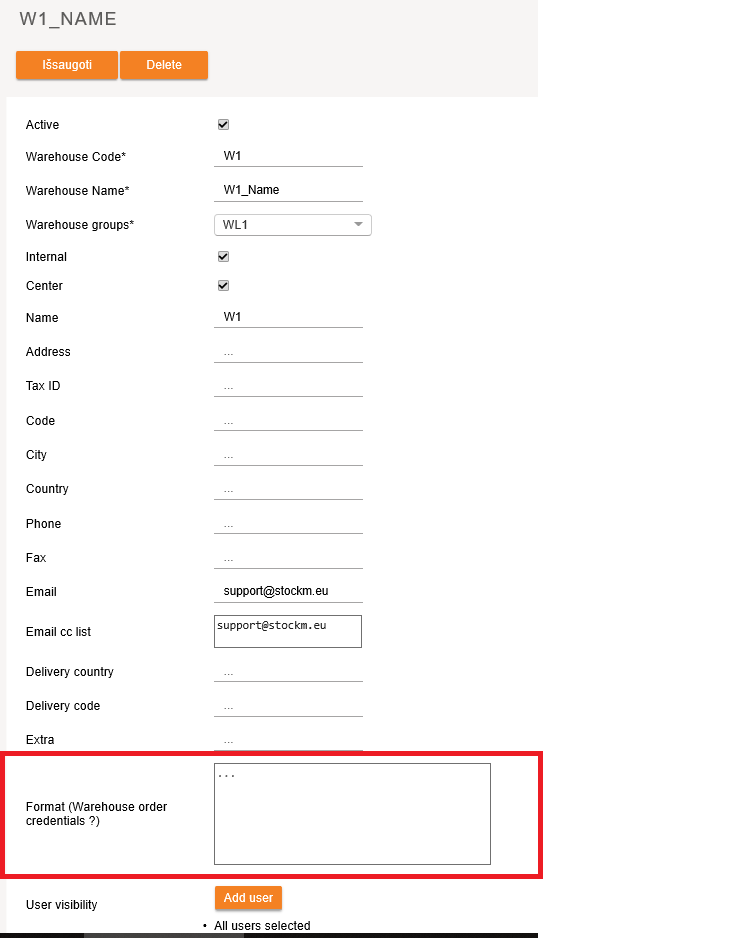
The warehouse information is set on the order form by entering it in the "Format (Warehouse order credentials)" field in Warehouse Settings when connected via SM Admin. You can specify all necessary information as warehouse name, address, etc. which will be shown on the order form.
What should be done to prevent the buffer from the too big decrease?
It is necessary to determine the minimum buffer and the system will not allow the buffer to decrease below the specified limit. Minimum buffer is the value at which the buffer can be reduced (buffer cannot be less than MinBuf or MOQ). The minimum buffer is changed on the item card. The minimum buffer is used when sales may be smaller, but it is necessary to keep in store more. For example, tyres, they can be sold as 1 pc, but most often the customer buys the whole set, i.e. 4 pcs. In this case, after setting the minimum buffer of 4, whatever the sales are, the system will not allow the buffer below 4.
Should the buffer be changed when the supply time is prolonged?
There are two options:
-When the supply cycle is prolonged (thinning shipments), because according to the old supply cycle a minimum order amount each time is not reached (the system evaluates it). In such a case if time of supply is increased up to 2 times, recalculation of the buffer is not required.
-If minimum order amount is reached every time at existing shorter supply time, in this case if time of supply is increased, the buffer should be increased by the same coefficient used to increase the supply time (using the 'Period' function).
Kaip pakeisti buferį keičiantis užsakymų dažnumui?
Smarkiai keičiantis tiekimo ciklui, kad nepritrūktų prekių - reikia perskaičiuoti buferius.
Naujo buferio apskaičiavimo formulė:
(Senas buferis - MUK) * koeficientas + MUK = naujas buferis
Koeficientą apskaičiuojame pagal formulę:
Naujas tiekimo ciklas/senas tiekimo ciklas = koeficientas
Pvz.: 1. Užsakymo dažnumas 2 kartai per mėnesį (14 d.)
Tiekimo laikas 14 d.
Senas tiekimo ciklas 28 d.
2. Užsakymo dažnumas 1 kartas per mėnesį (30 d.)
Tiekimo laikas 40 d.
Naujas tiekimo ciklas 70 d.
Koeficientas : 70/28=2,5
PASTABA
- kai ilgėja tiekimo ciklas, buferį visada reikia keisti, kad nepritrūktų prekių.
- kai trumpėja - analizuoti atvejį atskirai, nes sprendimas perskaičiuoti buferius labai priklauso kiek trumpėja;
- kai reikia retinti užsakymų dažnumą dėl nesusidarančių užsakymų, buferių perskaičiuoti nereikia, juos suvaldys sistema.
Ar galima padaryt DTO prekėms išstatymą, kad nerodytų pertekliaus?
Ne, nes DTO prekė yra ta, kuri užsakoma tik pagal spec.užsakymą. Jei prekę atsivežė, parduos ir daugiau neužsakys, tuomet ją ir reikia palikti DTO – tiesiog tokia realybė. Jei prekę atsivežė, parduos ir vėl atsiveš – prekė DTA, jei nenorime, kad jai keistųsi buferis – buferį reikia fiksuoti Min.buf=BUF=Max.buf.
Can DTO items be showed not as a surplus if they are used in exposition?
No, because the DTO item is the one that is ordered only on a special order. If the product has been brought, sold and will not be ordered again, then it should be left as DTO. If the product has been brought, sold and will be ordered again – the item is DTA. If you do not want the buffer to change – the buffer must be fixed in Min. buf = BUF = Max. buf.
Kaip skaičiuojami "ROI" ir "apyvartumas"?
raudona – apyvartumas, kartais per metus, mėlyna – ROI, procentais.
Apyvartumas – tai pardavimų ir atsargų santykis (pirkimo kainomis). Atsargų dinamikos lange atvaizduojamas raudona kreive. Atsargų dinamikoje apyvartumas pateikiamas kartais per metus (kuo didesnis, tuo geresnis), t.y. kiek kartų per metus „apsisuka“ atsargos įmonėje. Dashboarde apyvartumas pateikiamas dienomis (kuo mažesnis, tuo geresnis), t.y. ant kiek dienų turime atsargų.
ROI – tai maržos ir vidutinių atsargų santykis, atsargos pirkimo kainomis. Nuolaidų nežinome, skaičiai orientaciniai stebėti tendencijoms. Atsargų dinamikos lange atvaizduojamas mėlyna kreive.
Kokiomis kainomis skaičiuojami pardavimai?
Viskas STOCK-M‘e, išskyrus maržą, skaičiuojama pirkimo kainomis.
How "ROI" and "turnover rate" are calculated ?
Turnover is the ratio of sales and inventory (at purchase prices). Red line in Inventory Dynamics reports window shows turnover rate as times per year (the higher figure, the better result), i.e. how many times per year the inventory of the company "turns over" . Turnover you can find in Dashboard (window Today/ Home) is calculated in days (the lower figure, the better), i.e. for how many days you will have inventory on stock.
ROI is the ratio of margin and average inventory, inventory is calculated at purchase prices. The discounts are not known, therefore, the figure is just indicative to track trend. ROI is showed as a blue line in the Inventory Dynamics reports window.
Kaip STOCK-M’e priskirti alternatyvius tiekėjus?
Alternatyvus tiekėjas priskiriamas tik STOCK-M’e. Prekės kortelėje per tiekėjo lauką – galima pridėti ir pašalinti alternatyvius tiekėjus.
Kur galima pamatyti visų sistemoje esančių prekių sąrašus?
Visas aktyvias prekes, kurių būviai yra DTA, DTO ir NM galima pamatyti Atsargų lange. Šiame lange nebus rodomos prekes, kurios yra neaktyvios ir turi būvį NA arba yra kitų prekių alternatyvos. Visas prekes, kurių informacija buvo perduota į STOCK-M rasite: Redagavimas→Asortimento valdymas→Filtras: konkreti prekė SKU, tiekėjas, sandėlis ir t.t.
Kada naudojamas PTO?
Atsakymas – PTO rezervacija naudojama, kai nėra prekės likučio sandėlyje, kuriame daroma rezervacija. PTO rezervacijos gaunamos į STOCK-M‘ą pto.csv faile.
Kaip priskiriami prioritetai PTO rezervacijai?
Prioritetai taikomi skirstant prekes iš CS į filialus. CS laikomas per PTO rezervuotas kiekis, kol ateina grafikas filialui, kuris turi rezervaciją, net jei ir yra tiekiama į kitus filialus anksčiau – PTO kiekis jiems yra neatiduodamas. Kol kas nevertinama PTO rezervacijos data. T.y. vėliau PTO rezervaciją perdavęs filialas gali gauti prekes (paimti visą likutį iš CS) jei jo tiekimo grafikas yra ankstesnis.
Kaip formuojamas užsakymas, kai PTO rezervacijos prekė DTA?
Kai prekė DTA formuojant užsakymą kiekis apvalinamas į mažąją TNK pusę – todėl, kad PTO poreikio skirtumą išpildysime iš reguliaraus likučio. (Buferis – Likutis + saugumo buferis+ rezervacija + PTO).
Kaip formuojamas užsakymas, kai PTO rezervacijos prekė DTO?
Kai prekė DTO formuojant užsakymą kiekis apvalinamas iki pilno MUK/TNK į didžiąją pusę, nes atvežto kiekio turi pakakti pilnam užsakymo įvykdymui. Šiaip skirtumų neturėtų būti, nes vadybininkas priimdamas užsakymą turi atkreipti dėmesį į MUK ir TNK ir nepriimti užsakymo mažesniam kiekiui, nes atvežta prekė pagal spec užsakymą neturėtų patekti į likutį, o turėtų būti iškart parduota.
Kaip veikia PTO prioritetai?
PTO prioritetai veikia priklausomai nuo tiekimo grandinės ir galioja tam sandėliui, kuriame yra padaryta PTO rezervacija, prioritetas veikia per vieną tiekimo grandinę:
- Kai PTO yra regioniniame sandėlyje ir tiekimas į jį vyksta iš Centrinio sandėlio: PTO kiekis yra rezervuojamas Centriniame sandėlyje ir neskirstomas į kitus sandėlius pagal reguliarius užsakymus. Su artimiausiu tiekimu, prekė bus pristatytą PTO turinčiam sandėliui. Jei PTO yra iš daugiau nei vieno sandėlio – prioritetas sustatomas pagal tiekimo grafiką: prekes pirmas gaus tas sandėlis, kuriam yra ankstesnis tiekimo grafikas.
2. Kai PTO yra sandėlyje kuriam prekę tiekia išorinis tiekėjas – prioritetas nėra sustatomas, visos PTO prekės yra prioritetinės ir pridedamos prie reguliaraus užsakymo formuojamo tiekėjui pagal grafiką.
KODĖL...?
Kodėl šiandien prekė nepateko į reguliarų užsakymą?
SĄLYGOS, kad prekė patektų į reguliarų užsakymą:
- Prekės būvis turi būti DTA.
- Turi būti nustatytas tiekėjas prie SKU.
- Turi būti nustatytas tiekimo grafikas, jis turi būti aktyvus.
- Turi būti užsakymo data šiandien.
- Turi būti nustatytas prekei buferis.
- Turi būti poreikis prekei.
Kodėl sistema siūlo užsakyti būtent tiek?
Skaičiuojant užsakomą kiekį vertinami šie rodikliai:
1. Būvis.
2. Buferis.
2. Likutis.
3. Kiekis kelyje.
4. Rezervacija.
5. Saugumo buferis.
6. Specialus užsakymas
7. MUK.
Užsakomas kiekis = Buferis– Likutis – Kiekis kelyje + Rezervacija iš esamo likučio + Saugumo buferis + Spec. užsakymas
Kodėl buferis keičiamas mažiau nei per zoną?
Kai buferis artimas arba lygus MUK - galioja kitas buferio skaičiavimo algoritmas, kuris kelia arba mažina buferį pagal apskaičiuotus vidutinius pardavimus. Šis skaičiavimas taikomas lėtai judančioms prekėms, kad jų nepritrūktų iki artimiausio papildymo.
Kokie nustatymai turi būti, kad perskaičiuojant buferį, būtų vertinamas skaičius po kablelio?
Kintamo kiekio prekėms BUF ir MUK gali būti reikšmė su skaičiumi po kablelio. Kad buferio perskaičiavimas vyktų vertinant skaičius po kablelio matavimo vieneto kortelėje neturi būti varnelės ties „Reikšmė turi būti sveikas skaičius“. Į kortelę patenkama: Redagavimas → Matavimo vienetai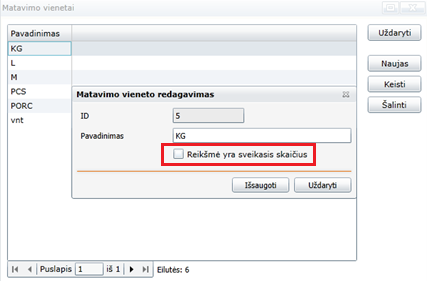
Kodėl pasikeitė buferis?
Jei tiekėjo nustatymuose uždėtos varnelės Automatinis buferių mažinimas ir didinimas, buferiai pagal tiekimo ciklą (RD, GD) automatiškai bus padidinti arba sumažinti, sistema kasdien tikrina likučių dominavimą zonose – jei per tiekimo ciklą likutis dominuos raudonoje zonoje, likutis bus padidintas, jei žalioje - sumažintas. Jei varnelių nėra – sistema pasiūlys didinti arba mažinti , tačiau galutinį sprendimą ar keisti buferį – priims vadybininkas.
Kada prekei priskiriamas NA būvis?
Kai duomenys prekei neatsinaujina daugiau nei 30 d. ji patenka į Sisteminius įspėjimus . Paspaudus mygtuką „Taisyti“ visų prekių būvis tampa NA.
Plačiau skaitykite Prekių (SKU) žymės
Kada prekei priskiriamas požymis NEW?
NEW požymis priskiriamas visoms naujai atsiradusioms prekėms ir būna priskirtas 3 mėn.
Plačiau skaitykite Prekių (SKU) žymės
Kada prekei priskiriamas požymis OUT?
OUT požymis priskiriamas išvedamai prekei, t.y. prekės kortelėje pažymėjus Out Mover varnelę. Šis požymis rodo, kad prekė išvedama iš asortimento ir kai bus parduotas visas dar sandėliuose esantis likutis prekė būvis bus pakeistas į NA ir ji nebebus matoma aktyvių prekių lange.
Plačiau skaitykite Prekių (SKU) žymės
Kada prekei priskiriamas požymis TOP?
TOP požymis priskiriamas DTA prekei, jei ji patenka į 80% apyvartos generuojančių prekių sąrašą. TOP požymis gali būti priskirtas ir prekei jau turinčiai kitą žymę.
Plačiau skaitykite Prekių (SKU) žymės
Kada prekei priskiriamas požymis NON?
NON požymis priskiriamas DTA prekei, jei ji patenka į 2% suminės apyvartos generuojančių prekių sąrašą. NON požymis gali būti priskiriamas ir prekei turinčiai OUT arba NEW žymę.
Kada prekei gali būti priskirta žymė TOP+NON?
Toks atvejis gana retas. Jis yra įmanomas, kai įmonė įveda labai daug naujų kortelių. TOP prekių sąrašas formuojamas iš visų DTA prekių, su visais požymiais. Formuojant NON prekių sąrašą į jį patenka visos DTA prekės išskyrus DTA prekes su žyme NEW. Pvz. Jei įmonėj yra 1000 SKU DTA prekių, iš kurių 300 SKU yra naujos prekės su žymė NEW – TOP sąrašas bus generuojamas iš visų 1000 SKU, o NON sąrašas bus generuojamas iš 700 SKU. Тaigi TOP sąrašo gale esanti prekė gali patekti ir į NON sąrašą.
Plačiau skaitykite Prekių (SKU) žymės